Taking a content design approach to how AI could help our colleagues

A colleague in a Co-op store is standing in the aisle of a store holding a small handheld device. She is inputting information into the handheld device. There are jars of jam and containers of coffee on the shelves behind her.


Our ‘How do I’ (HDI) website was created by content designers pair-writing with store and operational colleagues. The aim was to provide operational policy information, in a way that was easy to understand, in a busy store environment.

Store colleagues rely on ‘How Do I’ to comply with legal regulations and maintain high standards of customer service. Colleagues tell us it’s useful, but difficult to find some information quickly. Our Content Design and Data Science teams worked together to test how using generative artificial intelligence (AI) and a large language model (LLM) could help.

It proved to be a great opportunity to learn from how content designers can work with teams who want to make the most of AI capability.

Taking a content design approach

As a Content Design team at Co-op, we create content that is evidence-based, user-focussed, and based on shared standards to meet our commercial goals. We want to keep these content design principles at the centre of our approach to AI generated content.

The teams designed a process that combined a Co-op built AI and a Microsoft LLM. It means that when a user enters a query, a Co-op built AI system looks at a copy of our ‘How do I’ website and finds the information that is most likely to be relevant. It takes this data and the original question, and feeds it all to a Microsoft LLM. The LLM then generates a response and passes it back to the user as an answer.

How the AI works

There are a number of illustrations to show a process of how the AI works in steps.

Illustration 1: hands using a phone: Colleague types a question into AI HDI

Illustration 2: a screen with a magnifying glass and options: AI search engine looks up relevant information. from HDI. Keyword and semantic search. Passes the question and relevant info to LLM

Illustration 3: Letters LLM in a file: LLM generates a response and sends it back to the AI

Illustration 4: Mobile showing a list :Answer is provided to colleague

All of the content on the ‘How Do I’ (HDI) website was created and designed according to content design principles. As a result of the way LLMs work, without content design expertise, LLMs generate new content that is not subject to the same rigorous user-focussed design processes.

We needed to test how the AI was working to make sure it does not give misleading, unclear or inaccurate information. We analysed search data and worked with colleagues to identify the common queries they search for. This helped us to build an extensive list of test questions covering a wide range of operational, legal and safety related themes.

Testing and analysing the AI responses

When we tested the AI system with questions, we used the language our colleagues used. We asked simple questions and complex questions. We included spelling mistakes and abbreviations, then we analysed the AI system responses.

We took a content design approach and used our content guidelines to assess the responses. Validating the accuracy of responses included fact checking against the original ‘How Do I’ content to understand whether the AI had missed or misinterpreted anything.

We used this analysis to create a number of recommendations for how to improve the content of the AI responses.

Accuracy

Almost all the AI system responses provided information that was relevant to the question. But analysis showed it sometimes gave incorrect, incomplete or potentially misleading information. ‘How do I’ contains a lot of safety guidance, so to avoid risk for our colleagues, customers and business, we needed to make sure that any responses are always 100% accurate.

Accessibility

The initial AI system responses were hard to read because they were stripped of their original content design formatting and layout. Some of the responses also used language that sounded conversational, but added a lot of unnecessary words. LLMs tend towards conversational responses, which can result in content that is not accessible. It does not always get the user to the information they need in the simplest way.

Language

The AI did not always understand some of our colleague vocabulary. For example, it struggled to understand the difference between ‘change’ meaning loose coins, and ‘change’ meaning to change something. It did not understand that ‘MyWork’ referred to a Co-op colleague app. This meant it sometimes could not give relevant answers to some of our questions.

Using content design to improve the AI

Our Content Design team is now working with our data science team to explore how we can improve the AI system’s responses. We’re aiming to improve its accuracy, the language the AI uses, and reduce unnecessary dialogue that distracts from the factual answers. We’re also exploring how we can improve the formatting and sequencing of the AI responses.

This collaborative approach is helping us to get the most out of the technology, and making sure it is delivering high quality, accessible content that meets our users needs.

Based on the content design recommendations, our data science team have made changes to instructions that alter parameters for the AI, which is also known as ‘prompt engineering’. This affects the way the AI system breaks down and reformats information. We’re experimenting with how much freedom the AI has to interpret the source material and we’re already seeing huge improvements to the accuracy, formatting and accessibility of the responses.

Impact of the innovation of this AI work

“The ‘How Do I’ project has been hugely innovative for the Co-op. Not only in the use of the cutting edge technology, but also in the close cross-business collaboration we needed to find new solutions to the interesting new problems associated with generative AI. We’ve worked closely with Joe Wheatley and the Customer Products team, as well as colleagues in our Software Development, Data Architecture and Store Operations teams. We’ve been able to combine skills, experience and knowledge from a wide range of business areas and backgrounds to build a pioneering new product designed with the needs of store colleagues at its core.”

Joe Wretham, Senior Data Scientist

The future of AI and content design

AI has so many possible applications and its been exciting to explore them. This test work has also shown the critical role content design has in making sure we are designing for our users. AI can create content that is appears to make sense and is natural sounding, but the content needs to help users understand what they need to do next, quickly and easily.

Content designers understand users and their needs. This means understanding their motivations, the challenges they face, their environment, and the language they use. The testing we’ve done with the ‘How do I’ AI system shows that AI cannot do this alone, but when AI is combined with content design expertise, there are much better outcomes for the user and for commercial goals.

The content design team at Co-op have been exploring how they can balance current content design responsibilities with exploring skills and new areas for development in AI.

Blog by Joe Wheatley

Find out more about topics in this blog:

How we helped to develop a model for data ethics 

It’s important to us that we’re thinking about data ethically and that we’re using data in the right way.  

The speed of technology and artificial intelligence development is also putting data ethics in the spotlight, and it is more important than ever that we measure our progress.  

Co-op were asked by the Open Data Institute (ODI) to review and give feedback on the data ethics Maturity Model. We then used the tool to become the first organisation to independently assess our data ethics maturity and use it to improve our ethical data practice.

How the ODI Data Ethics Maturity Model works 

The model can be used at any stage of an organisation’s data ethics development and is designed to encourage discussions and raise awareness of data ethics. The model covers 6 themes including governance, skills, processes and legal compliance. We use the themes to help identify opportunities to progress through the 5 levels of maturity.  

We worked collaboratively to assess how to use the model 

We decided to take our time to agree: 

  • what we wanted to use the tool for 
  • how to measure our current position 
  • the scores that we wanted to reach 

Our aim was to help drive out opportunities and training needs, and to prioritise activities within the business. We also needed an action plan to increase the data ethics maturity level across the 6 themes. 

We organised workshops with participants from the Data Governance team and input from the Data Ethics Advisory Group. Carrying out the assessment annually meant that we could review actions regularly to make sure we’re making progress. We also shared all the outputs with our senior leaders, the Data Ethics Advisory Group and the ODI. 

We adjusted the model to work at Co-op 

The model is designed to cover all types of organisations, so sometimes the description within the assessment did not align to Co-op. We adjusted the wording so that it was more relevant to us and created some definitions. This will help us to make sure we are consistent when we do the assessment next time. 

Co-op has worked on data ethics for a few years, so we baselined our scores as level 3 – ‘Defined’ initially. We then adjusted it according to the evidence we could provide to support the maturity level with a traffic light system: 

Green
The activity already exists and we have evidence to support the score.
Yellow
We partially meet the criteria and have some evidence to support the score.
Red
The activity does not exist or we do not have evidence to support it.

Our Data Ethics Advisory Group reviewed our scores before we submitted our assessment to the ODI. 

How the model helped us 

The model has helped us to formalise our process and focus our efforts, including: 

  • identifying some quick wins which we have detailed within our action plan 
  • realising that maturity does not have to be at level 5 across all themes 
  • focusing on themes that are higher priority to Co-op  
  • understanding that data ethics is not only the responsibility of the Data Governance team and that we need to develop our relationships with other teams  
  • using the Data Ethics Maturity Model to help Co-op fulfil our mission of being trusted with data 

Tips for carrying out a data ethics assessment  

If you’re thinking about creating a maturity assessment, it’s important to tailor it to help your organisation. The ODI provide help on using the tool but they do not publish scores or certify the results, so it’s about making it work for you. 

It’s OK to adjust the wording within the model so it aligns with your ways of working. You can note down how you’re interpreting the scores, so that you can reflect on your progress later.  

When you score each theme, it’s important to be honest. It will help when you build your action plan. It’s also OK to give yourself a half mark if you’ve only met part of a level within a theme. 

Evidence to support your scores can come in all shapes and sizes, and could include presentation recordings, policies, or meeting packs. If you have little or no evidence to support your score, do not be afraid to reduce it. You can always collect evidence for your next assessment.  

Be realistic when you decide what your desired score should be. We steered away from setting our desired score as level 5 – ‘Optimising’. This helped us to set realistic expectations and grow our data ethics maturity steadily over time. 

Sarah-Jane Moss, Data Governance Manager, Co-op 

Tricia Wheeler, Chair, Data Ethics Advisory Group, Co-op 

Supported by James Maddison, Senior Consultant, ODI 

How a voice user interface could help our Funeralcare colleagues

Sometimes in organisations – and especially in digital teams – we start a piece of work but for various reasons we don’t roll it out. The work we’re talking about in this post is an example of this and although it looked very much like it had potential to meet our colleagues’ needs, we’re taking a break from it. The work helped us learn what a complex area we were dealing with and how very important it would be to get this absolutely right.  

We may revisit the work in the future. For now, we’re sharing the valuable insights we got from it. 

Co-op Guardian uses Amazon Web Services (AWS) and in August 2019, as part of Amazon’s consultancy package, we decided to explore voice interfaces. We wanted to find out if  Amazon Alexa – their virtual assistant AI (artificial intelligence) – could help us solve a problem on one of our projects. We worked together to see how we could use AI to help our Funeralcare colleagues who embalm the deceased.

This post is about what we did and what we learnt, as well as the problems a voice user interface might fix, and the problems over-reliance on – or careless use of – one might create.

About the embalming process

Some of our Co-op Funeralcare colleagues ‘embalm’ the deceased. Embalming is the process of preparing the deceased by using chemicals to prevent decomposition as well as making sure they look suitable for the funeral or a visit at the funeral home. Many friends and family members feel that seeing their loved one looking restful and dignified brings them peace and helps with the grieving process.

What’s not so great right now

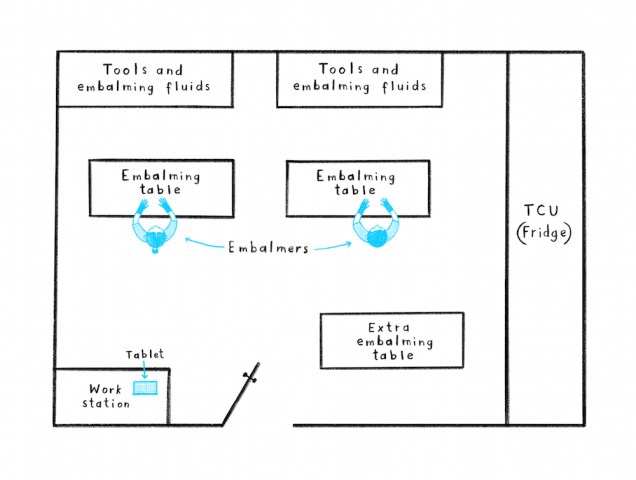
floorplanAt the moment, our embalmers have tablets with their notes and instructions about how to present the deceased. They refer to them throughout the process. But colleagues tell us there are problems with this, for example:

  1. Tablet screens are small and not easy to see from a distance.
  2. Although they’re portable, positioning tablets conveniently close to the embalming table is tricky, and the charging points aren’t always close by.
  3. Wifi can be spotty because embalming suites sometimes have thick walls and ceilings, plus extra insulation to help with careful temperature control.

Perhaps the biggest problem however comes when colleagues need to double check instructions or details and the tablet has timed out. They need to remove their gloves, sign back into the tablet, find the information and replace their gloves. Recent government guidance, plus an internal review, suggests hands-free devices are a good way to avoid unnecessary contact.

Could Alexa help? We had a hunch that she could. Here’s what we did.

Captured possible conversations and created a script

As a starting point, we used what we’d already seen happen in embalming suites during our work on Guardian. We thought about what an embalmer’s thought process might be – what questions they may need to ask and in which order. Based on that, we drafted a script for the sorts of information Alexa might need to be able to give.

photograph of post its up on a wall depicting what alexa and the embalmer might say

But language is complex. There are many nuances. And an understanding of users’ natural language is important to be able to help Alexa win their confidence and 2. accurately identify (‘listen to’) questions and respond.

Turning written words into spoken ones

We pre-loaded questions and responses we knew were integral to an embalming onto a HTML soundboard using Amazon Polly, which can recreate an Alexa-like voice. At this early stage of testing it was better to use the soundboard than to spend time and energy programming Alexa.

laptop_alexa_embalmerWe:

  1. Wrote the content peppered with over-enthusiastic grammar which we knew would prompt Polly to emphasise and give space to important information. For example, “We’re ready to go. From here, you can. ‘Start an embalming’. ‘Review a case’. Or. ‘Ask me what I can do’.
  2. Connected our laptop to an Echo speaker using bluetooth.
  3. Turned the mic off on the Alexa. Told participants that she was in dev mode and asked them to speak as they normally would.
  4. Responded to what they said to Alexa by playing a relevant clip from Polly.

This is a great way of learning because it allowed us to go off script and means we didn’t have to anticipate every interaction.

Over time we’d learn what people actually say rather than second-guessing what they would say. We’d then add the wealth of language to Alexa that would allow for nuance.

Research run-through

One of the reasons for doing this piece of work was to see if we could give time back to embalmers. With this in mind, we did a dummy run with ‘Brenda’ in the photograph below. It helped us to pre-empt and iron out problems with the prototype before putting it in front of them. Fixing the obvious problems meant we could get into the nitty-gritty details in the real thing.

photograph of 'brenda' a outline of a person drawn onto a huge sheet of paper placed on the table for the research dummy run.

During research, we were manually pushing buttons on the soundboard in response to the participants’ conversation (although the embalmers thought the responses were coming from Alexa).

High-level takeaways from the research

Four weeks after we began work, we took our prototype to Co-op Funeralcare Warrington and spent half a day with an embalmer. We found:

  1. The embalmer didn’t have to take her gloves off during the test (cuppa aside ☕).
  2. For the 2 relatively short, straightforward cases we observed with the same embalmer, the voice user interface was both usable and useful. That said, the process can take anywhere from 30 minutes to 3 hours and more complicated or lengthy cases may throw up problems.
  3. The embalmer expected the voice assistant to be able to interpret more than it can at the moment. For example, she asked: “Should the deceased be clean-shaven?” But the information she needed was more complex than “yes” or “no” and instructions had been inputted into a free text box. Research across most projects suggests that if someone can’t get the info they want, they’ll assume the product isn’t fit to give any information at all.

The feedback was positive – yes, early indications showed we were meeting a need.

What we can learn from looking at users’ language

When someone dies, family members tell funeral arrangers how they’d like the deceased to be presented and dressed for the funeral and any visits beforehand. Colleagues fill in ‘special instructions’ – a free text box – in their internal Guardian service.

We looked at the instructions entered in this box across the Guardian service. Our analysis of them drew out 3 interesting areas to consider if we take the piece of work forward.

  1. User-centred language – Rather than collecting data in a structured ‘choose one of the following options’ kind of way, the free text box helps us get a better understanding of the language embalmers naturally use. Although we don’t write the way we speak, we can pick up commonly-used vocabulary. This would help if we wrote dialogue for Alexa.
  2. Common requests – After clothing requests, the data shows that instructions on shaving are the most frequently talked about. Hair can continue to grow after death so embalmers will by default shave the deceased. However, if the deceased had a moustache, embalmers need to know that so they tidy it rather than shave it off. It could be hugely upsetting for the family if the deceased was presented in an unrecognisable way. With this in mind, it would be essential that the AI could accurately pick out these details and make the embalmer aware.
  3. Typical word count – Whilst the majority of instructions were short (mostly between 1 to 5 words) a significant amount were between 35 and 200 words which could become painful to listen to. There would be work around how to accurately collect detailed instructions, in a way that made playing them back concise.

AI can make interactions more convenient

Everything we found at this early stage suggests that designing a voice user interface could make things more convenient for colleagues and further prevent unnecessary contact.

However, because it’s early days, there are lots of unknowns. What happens if multiple people are in the embalming suite and it’s pretty noisy? How do we make sure our designs cater for differing laws in Scotland? When we know the ideal conditions for voice recognition are rarely the same as real life, how do we ensure it works under critical and sensitive conditions?

They’re just for starters.

With a process as serious and sensitive as embalming there’s no such thing as a ‘small’ mistake because any inaccuracies could be devastatingly upsetting to someone already going through a difficult time. Sure, Alexa is clever and there’s so much potential here but there’s a lot more we’d need to know, work on, fix, so that we could make the artificial intelligence part of the product more intelligent.

Tom Walker, Lead user researcher
Jamie Kane, user researcher

Illustrations by Maisie Platts