Taking a content design approach to how AI could help our colleagues

A colleague in a Co-op store is standing in the aisle of a store holding a small handheld device. She is inputting information into the handheld device. There are jars of jam and containers of coffee on the shelves behind her.


Our ‘How do I’ (HDI) website was created by content designers pair-writing with store and operational colleagues. The aim was to provide operational policy information, in a way that was easy to understand, in a busy store environment.

Store colleagues rely on ‘How Do I’ to comply with legal regulations and maintain high standards of customer service. Colleagues tell us it’s useful, but difficult to find some information quickly. Our Content Design and Data Science teams worked together to test how using generative artificial intelligence (AI) and a large language model (LLM) could help.

It proved to be a great opportunity to learn from how content designers can work with teams who want to make the most of AI capability.

Taking a content design approach

As a Content Design team at Co-op, we create content that is evidence-based, user-focussed, and based on shared standards to meet our commercial goals. We want to keep these content design principles at the centre of our approach to AI generated content.

The teams designed a process that combined a Co-op built AI and a Microsoft LLM. It means that when a user enters a query, a Co-op built AI system looks at a copy of our ‘How do I’ website and finds the information that is most likely to be relevant. It takes this data and the original question, and feeds it all to a Microsoft LLM. The LLM then generates a response and passes it back to the user as an answer.

How the AI works

There are a number of illustrations to show a process of how the AI works in steps.

Illustration 1: hands using a phone: Colleague types a question into AI HDI

Illustration 2: a screen with a magnifying glass and options: AI search engine looks up relevant information. from HDI. Keyword and semantic search. Passes the question and relevant info to LLM

Illustration 3: Letters LLM in a file: LLM generates a response and sends it back to the AI

Illustration 4: Mobile showing a list :Answer is provided to colleague

All of the content on the ‘How Do I’ (HDI) website was created and designed according to content design principles. As a result of the way LLMs work, without content design expertise, LLMs generate new content that is not subject to the same rigorous user-focussed design processes.

We needed to test how the AI was working to make sure it does not give misleading, unclear or inaccurate information. We analysed search data and worked with colleagues to identify the common queries they search for. This helped us to build an extensive list of test questions covering a wide range of operational, legal and safety related themes.

Testing and analysing the AI responses

When we tested the AI system with questions, we used the language our colleagues used. We asked simple questions and complex questions. We included spelling mistakes and abbreviations, then we analysed the AI system responses.

We took a content design approach and used our content guidelines to assess the responses. Validating the accuracy of responses included fact checking against the original ‘How Do I’ content to understand whether the AI had missed or misinterpreted anything.

We used this analysis to create a number of recommendations for how to improve the content of the AI responses.

Accuracy

Almost all the AI system responses provided information that was relevant to the question. But analysis showed it sometimes gave incorrect, incomplete or potentially misleading information. ‘How do I’ contains a lot of safety guidance, so to avoid risk for our colleagues, customers and business, we needed to make sure that any responses are always 100% accurate.

Accessibility

The initial AI system responses were hard to read because they were stripped of their original content design formatting and layout. Some of the responses also used language that sounded conversational, but added a lot of unnecessary words. LLMs tend towards conversational responses, which can result in content that is not accessible. It does not always get the user to the information they need in the simplest way.

Language

The AI did not always understand some of our colleague vocabulary. For example, it struggled to understand the difference between ‘change’ meaning loose coins, and ‘change’ meaning to change something. It did not understand that ‘MyWork’ referred to a Co-op colleague app. This meant it sometimes could not give relevant answers to some of our questions.

Using content design to improve the AI

Our Content Design team is now working with our data science team to explore how we can improve the AI system’s responses. We’re aiming to improve its accuracy, the language the AI uses, and reduce unnecessary dialogue that distracts from the factual answers. We’re also exploring how we can improve the formatting and sequencing of the AI responses.

This collaborative approach is helping us to get the most out of the technology, and making sure it is delivering high quality, accessible content that meets our users needs.

Based on the content design recommendations, our data science team have made changes to instructions that alter parameters for the AI, which is also known as ‘prompt engineering’. This affects the way the AI system breaks down and reformats information. We’re experimenting with how much freedom the AI has to interpret the source material and we’re already seeing huge improvements to the accuracy, formatting and accessibility of the responses.

Impact of the innovation of this AI work

“The ‘How Do I’ project has been hugely innovative for the Co-op. Not only in the use of the cutting edge technology, but also in the close cross-business collaboration we needed to find new solutions to the interesting new problems associated with generative AI. We’ve worked closely with Joe Wheatley and the Customer Products team, as well as colleagues in our Software Development, Data Architecture and Store Operations teams. We’ve been able to combine skills, experience and knowledge from a wide range of business areas and backgrounds to build a pioneering new product designed with the needs of store colleagues at its core.”

Joe Wretham, Senior Data Scientist

The future of AI and content design

AI has so many possible applications and its been exciting to explore them. This test work has also shown the critical role content design has in making sure we are designing for our users. AI can create content that is appears to make sense and is natural sounding, but the content needs to help users understand what they need to do next, quickly and easily.

Content designers understand users and their needs. This means understanding their motivations, the challenges they face, their environment, and the language they use. The testing we’ve done with the ‘How do I’ AI system shows that AI cannot do this alone, but when AI is combined with content design expertise, there are much better outcomes for the user and for commercial goals.

The content design team at Co-op have been exploring how they can balance current content design responsibilities with exploring skills and new areas for development in AI.

Blog by Joe Wheatley

Find out more about topics in this blog:

How we’ve helped users understand Membership

At one point or another, most digital teams have been convinced that their assumption about how to fix something will work but when they’ve tested it, they’ve found they’re still way off solving the problem.

That’s ok.

It’s fine to ‘fail’ as long as you do it quickly, learn from it and make changes to make things better. It’s part of working in an agile way. We should talk about failing more often. So, here’s an example of how we failed fast and learnt quickly in the Membership team.

Making assumptions based on user research

We’d seen from user research that most people, especially those who were new members, didn’t understand what a co-op is, how one operates and why it’s a different way of doing business.

Most people, especially those who are new members, don’t understand it even though we include loads of info on co-ops when we send out membership cards. But it looks like people either don’t read it at all, or, if they do, they don’t remember the information. Without that understanding, the Co-op Membership is just another loyalty card to most people.

During user research sessions when we talked about the idea of a co-op, people seemed interested. Not everyone, but some. The problem seemed to be not with the quality of information being given, but where and how in the user journey it was given.

It seemed if we could more effectively convey the concept of a co-op, that would be enough for some users to become more engaged. Certainly they would be better able to make an informed decision whether they wanted to get involved. They’d become true co-operators as opposed to just loyalty card users.

Making changes based on our assumptions

We designed an interaction where the information about co-ops and Co-op Membership was introduced to people as part of the online registration. Our hypothesis was that at this point in the user journey the member is more committed and more likely to have time to read this information and be more receptive to it.

By chunking the content into sections and importantly making it dismissable, the user would be able to digest as much or as little as met their needs, rather than being faced by the entirety of the proposition in one hit.

We know people don’t read things online. In fact you’re lucky if people read more than 20% of what you stick on a screen so we kept that in mind with the design.

Here are 2 examples of pages from the prototype.

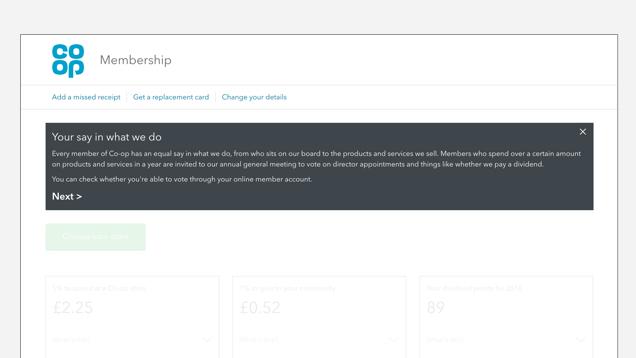
Image shows a screenshot of a member account and a box out with information about Co-op Membership. It says: 'Your say in what we do' and gives an overview of things members can do.

Image shows a screenshot of a member account and a box out with information about 'Your 5% reward'

Then we tested the new design

During 2 rounds of research we spoke to 12 people (you can read more about our views on samples sizes in James Boardwell’s blog post ‘Small is beautiful’). The group included a mixture of ages, online capabilities and length of time being a member.

Before showing them our new design we asked each participant to fill in a short questionnaire to find out what they understood about Co-op Membership. We then interviewed them, and showed them the prototype that was intended to help them understand the idea of a co-op.

At the end of the session we asked them to fill in the same questionnaire.

Results showed we hadn’t got it right

As we expected, before looking at the prototype people didn’t understand:

  • what rewards they earned as a Co-op member
  • what a co-op is
  • elements of the Co-op such as the dividend, democracy and engagement

And the post-prototype results weren’t any better – the new design had had zero effect on users’ understanding.

Picking ourselves up. Trying again

We’d seen people read the information, but they didn’t take it in. Although we were giving them more control, we were still imposing a bulk of potentially irrelevant content rather than letting the user discover it in their own time, and reading as much or as little as met their need.

For some people, some of the information would have been both relevant and necessary – but for most their primary need at this point was to find out ‘what’s in it for me’ and everything else was a distraction.

So we iterated again. This time we wanted to give people a positive interaction that let them get only what they wanted, at a time when they needed it.

We added a ‘what’s this?’ drop down within members’ accounts to explain both rewards and Co-op points. Here’s how the current design looks.

Image shows a screenshot of the current design that has tested well. It shows the 'what's this' drop down box in a closed position.

Image shows a screenshot of the current design that has tested well. It shows the 'what's this' drop down box with content underneath that explains what this is.

We’d seen in research that many people often didn’t know exactly what they got for being a member so adding this was important.

Better results this time

During research we watched people time and again interacting with the drop down, unprompted. Responses were often comments from the user such as ‘ahhh, so that’s how it works’ or ‘I didn’t know that, I thought they’d send me vouchers’.

If there wasn’t that immediate, unprompted reaction we’d then follow it up with questions such as ‘what made you click on that’ and ‘what did it tell you’. This made us confident in what we were seeing had met the need we’d identified and so we released it. We know people are making use of it. Google Analytics tells us those drop down controls have been clicked 250,000 times since we released it on 14 February.

So after failing often and learning from, and iterating on, what users were saying to us, we’ve made good progress on helping people understand what rewards they’ve earned as a Co-op member.

We’re still researching how best to help people get a deeper understanding of what a Co-op is including elements of the Co-op such as the dividend, democracy and engagement. Those are things we haven’t solved yet, but we will. And it’ll probably involve a lot of failing fast.

Simon Hurst
User research

We’ve updated the ‘forms’ bit of our design manual

On 26 January 2017 we posted to say we’d released our design manual so we could start to share design styles, patterns and advice for people building digital services at Co-op.

We’ve now updated the section about making forms. We’ve done this so that our forms are clear, simple and easy to understand for anyone who wants to use them.

The forms section now includes information about ‘inputs’ (any point that the user gives us data), ‘patterns’ (ways to solve commonly occurring problems) and advice about how to design a good form.

Form inputs and patterns

We’ve updated our form input and pattern guidance with things that the design team has learned over the past 2 months.

You can use the manual to find out why, when and how to:

  • use things like radio buttons, checkboxes and text areas
  • ask people for personal information like their name, address, date of birth and so on
  • tackle recurring patterns like validation messages and ‘progressive reveals’ (showing more information based on a previous answer)

Designing a good form

But, we didn’t want it just to be a pattern library. As Steve Krug said in his foreword to ‘Forms that work‘ by Caroline Jarrett and Gerry Gaffney:

“[Form design] isn’t just about colons and choosing the right widgets. It’s about the whole process of making good forms, which has a lot more to do with making sure you’re asking the right questions in a way that your users can answer than it does with whether you use a drop-down list or radio buttons.”

So, we’ve included advice about forming, structuring and wording questions to encourage us to consider the effect on the user at every point of the interaction.

What’s next

The next thing we’re going to look at is how we should design tables and data visualisation at Co-op. This will include research about:

  • how words and figures are presented
  • horizontal and vertical space
  • type sizes and weights
  • lines
  • colour
  • basic trends and comparisons

We’ll update you with the things that we learn.

Tell us what you think

Check out our updates to the form section and let us know what you think — you can now send us feedback directly from each page of the manual, without having to email.

Your feedback will make the design manual better.

Joanne Schofield
On behalf of the Design Manual Team

We’ve released coop.co.uk/designmanual

Today we’ve released coop.co.uk/designmanual. The digital design manual is the new version of the ‘Co-op style guide’. In June 2016 I wrote about our progress with how we design digital services at Co-op. Since then, we’ve fixed the basics, taken a fresh look at what the design manual is for, and we’re now providing a stronger baseline for future Co-op services to be built on.

There are actually 3 things that help us design digitally:

  1. Design manual: our guidelines on digital design.
  2. Front-end toolkit: the Sass (CSS) that gives the design manual and our services their base look and feel.
  3. Prototyping kit: that allows designers and developers to quickly test and iterate services.

The design manual can help if you:

  • design or build digital services at the Co-op
  • write digital content for the Co-op
  • are checking if a service meets the standards, matches our design principles and the Co-op’s values

We want the design manual to:

  • help teams release faster and focus on user needs rather than spending time on the basics
  • help document what we learn from research so we apply it in our work
  • be a collaborative document that is widely and regularly contributed too

The design manual isn’t a set of rules, it’s a strong backbone for our digital services. It will change in line with learnings from user research, the changing business landscape or new technology. The design manual and its assets are the starting point for designers to design, not paint by numbers.

design-manual-1

What we’ve done

Reworked our basic design system

We’ve actually removed quite a lot from the style guide. At least for now anyway. It’s ok if a service still uses these things but we want evidence of how they’re working for users before we add them back in.

Some of the changes we’ve made are:

We reworked our typography

What we had worked well for our printed material. But, it needed to be bolder and more flexible so it’d be suitable for different devices and have a better vertical rhythm (the vertical spacing we use between text and other page elements) to make it more easily legible on screen.

design-manual-2

We added guidelines for writing for Co-op

Writing for digital is different to writing for other mediums. It’s about finding and doing things quickly — getting maximum meaning into minimum content.

We looked at how we approach accessibility

Equality and equity sit at the heart of the Co-op’s values so it’s important to us that anyone can use Co-op digital services. Becky Arrowsmith recently wrote about how we’ve been improving accessibility in the Co-op wills service.

We created some design principles

Our principles help to align ourselves around some central ideas that will guide our future design decisions. We’ll be writing more about these soon.

We’ve given it a new name

It’s now called the ‘design manual’.

This signifies a move away from ‘rules’ about design elements, to evidence-based advice on how design patterns are used in combination to create compelling digital services. This advice will evolve as we learn more about what works for the people who use our services.

What does this mean for our current services?

As a favourite quote of mine from information architect Abby Covert says:

‘Perfection isn’t possible, but progress is.’
Abby Covert – How to make sense of any Mess

You’ll start to see more of Co-op’s digital services sharing this updated design language creating consistent experience across the wills service, Membership, co-operative.coop and coop.co.uk. We don’t expect every service to suddenly shift all of their design work over to match the updated design language though. Instead, you’ll see a more gradual iteration as services adopt the updated styles – something many of our designers are already doing.

What’s next?

Most importantly we want to iterate and release much more often. This is an extra part of everyone’s job so keeping this momentum up is always the challenge.

We will:

  • create a more visible backlog of upcoming improvements based on user research and live services
  • put in place a clear way for colleagues to feed into the design manual
  • look at what our shared design language for more complex design elements should be
  • communicate changes to the design manual effectively and widely
  • add more guidance about writing for Co-op
  • find a way to host and link to user research from design elements
  • develop the user journeys and information architecture for users of the design manual
  • link to live examples of design patterns in use
  • create a more simple HTML and CSS template for developers
  • continue to refactor and improve the front-end tool-kit
  • do ‘show and tells’ on each release

Finally, a thank you

Creating and maintaining a strong design system is not easy. It requires a lot of buy-in from an organisation and a lot of extra work from its contributors. With cooperation being at the heart of what we do it’s no surprise that I’ve had this from all the service teams, business units and senior leadership I’ve worked with as well, of course, from the design team. Thank you to everyone – too many to mention – who has been involved so far.

The design manual will continue to grow and evolve as our services do. You mark my words.

Matt Tyas
Interaction designer

We’ve made co-operative.coop better

Today we’ve released a new improved version of co-operative.coop. Previously, if you went to coop.co.uk or co-operative.coop you would see exactly the same content. Not anymore. They’re now 2 separate websites, each supporting different needs.

We’ve split up the content so that:

  • coop.co.uk is the way to access our products and services
  • co-operative.coop is the way you can find out how our co-operative is working and how you can get involved with it   

Fixing the basics

The new co-operative.coop fixes a lot of the basics. The new site is:

  • responsive it works well on mobile, tablets and laptops
  • fast – it takes less than a second to load a page compared with 6.5 seconds on the old site
  • secure – it uses Hypertext Transfer Protocol Secure (HTTPS) when loading a web page which means that when you use some web browsers you see a green padlock

This is important because next month the Chrome web browser will highlight non HTTPS sites as not being secure.

The content’s better too

All the changes above are the features you’d expect on any modern website. Like we said, they’re the basics. The biggest change we’ve made is the content. It’s very easy to create a lot of content but it’s much harder work to create good, concise content. For this reason we’ve removed hundreds of pages so that the content meets the needs of the people using the site.

We’re not finished

Changing to co-operative.coop is just the start. The improvements will be ongoing. Previously an external company looked after the site for us which meant only occasional changes.

Our new site was built by our in-house team. They work in an agile way. We ask for feedback at the bottom of each page which means the team is continually listening to our members and anyone else using the site. 

Feedback prompt on each page asks site visitors to tell us what they liked or what we can improve'

Doing things ourselves and working in this way means we can iterate quickly, and often. Making it better every time we make a change. 

We’ve worked with our Group Secretariat, consulted our Members’ Council and have shown the new site to the Digital Working Group on several occasions. Thank you to all.

Our team shows members of the Digital Working Group our work co-operative.coop in Federation house

Thanks also to Peter Brumby and all the team who’ve made this happen.

We’re going to continue to work together to improve the new site for our members.

Mike Bracken
Chief Digital Officer

Nick Crofts
President of National Members’ Council

Starting work on our content design principles

I’m Sabrina and I’m a web content consultant on the Co-op Insurance digital content team. Recently, me and my colleagues Elliot and Huw got together with Co-op Group Digital and content strategist Sarah Richards to start putting together some content design principles. This post is about the reasons for doing this, as well as what we did in the first of the 2 content workshops. We’ll talk about the second workshop in another post soon.

Balancing good content with insurance rules and regulations

On the Co-op Insurance team, we’re working towards an easy-to-use service that lets customers put in their details, choose the right cover for them, get a quote and buy the insurance. It should be simple. But the insurance industry is governed by rules and regulations. Because of this we’ve found that content design (the words, the prompts and the order the pages appear) can be overlooked which is dangerous because good content design puts the user first. The user, or customer, should be able to visit the site and find what they’re looking for easily and quickly. Putting together some content design principles will help us put the customer first, always.

Taking a user-centred approach

Our user testing and customer journey mapping showed us that customers want to reach their insurance quote quickly and easily. However, it was easy to put perceived business needs above customer needs. This meant we were inclined to put small print in a more prominent position than other insurers which meant that the site was full of ‘important’ information that nobody reads.

Customers shouldn’t need to understand the complex financial issues attached to buying insurance. It’s our job to mask quirks, legalese and regulations with plain, compliant English.

We’re working towards putting a content style guide together to improve the way we approach content, particularly with regard to education of stakeholders. Meeting people from around the Co-op in the 2 workshops has helped us do that.

Workshop 1: mapping the process

We used different coloured post-its to map out the process we go through to get new content on the site. This way it was easy to see:

  • the number of steps and the timeframes they happen in
  • at which points stakeholders get involved
  • digital and approval systems
  • where the pain points are

We used blue post-its for each step in the publishing process. We then added pink post-its to show which stakeholders are involved and at what point. Seeing the stakeholder involvement mapped against the whole process is a good way to see where early stakeholder engagement might help smooth the process further down the line.

We also mapped out where digital approval systems are used. This helped to identify the influence that such systems have on both stakeholders and steps.

Finding pain points is the first step to fixing things

Finally we added in more post-its to highlight the parts in the process that are usually troublesome. Linking the pain points to the steps helped us investigate why these parts are tricky and also identify any recurring themes. The workshop gave the team some great ideas about how we can improve the process and how pain points can be reduced or eliminated. We’ll use this to help set out a new process for publishing content and it will feed into our content design principles.

It isn’t easy changing process or behaviour, particularly when there are a lot of stakeholders involved. But the process mapping is a solid starting point and it is a great tool to spark discussion around change.

We’ll be blogging about our second workshop on user stories soon. You can sign up to the blog to make sure you don’t miss it.

Why content design matters at Co-op

Hello, I’m Joanne, a new Content Designer at Co-op. I’m one of 3 new content designers who’ve recently joined CoopDigital’s design team. The team has a range of experience and skills from user research to interaction design. We’ve been recruited from both within and outside Co-op to build transformational, user-focused digital services.

Content design might be new to you. So, here’s what it is, how it’ll change what we put on Co-op’s website and why it’s essential for the future of the business.

Content designers Joanne Schofield, Fiona Linton-Forrest & Sophie Colbert

What is content design?

Content design isn’t just writing and editing words.

Content design is discovering why someone has come to our website or web page – what they came to do, find out, order – then exploring the quickest, easiest, simplest way to allow them to do that.

Content design gives essential content only at the point that it’s relevant and through the most effective channel. That means we must understand the whole service – all the steps the user goes through to get their task done – to determine the most effective place to give the user information.

So, content designers will ask ‘why?’. A lot.

Why we need to design content

The internet has given customers power. Expectations are raised. People expect online services to be easy and straight-forward. If we don’t serve customers well, we’ll disappoint them, frustrate them, lose their trust, and consequently their business.The future of Co-op relies on knowing our users and making services that will make their lives simpler.

It’s impossible to have good services without good content design. Getting information to people when they need it, how they need it and in a way that they understand, is critical. Content is the service.

So, we research our services with real users. We’re building services that we’re proud of, that are revolutionary, but more importantly, are built with the user at the centre.

Words get in the way

Users interact with web content in a different way to print. They’re impatient. They’re usually on a mobile device and time-poor. So they skim-read, looking for headings and links that will help them get to where they need to be. 75% of each web page isn’t read. We need to edit content to a bare minimum and get out of the way, so the user can get where they need, fast.

Web content should only exist if we know that there’s a need for it to be there. People generally don’t want to spend much time on a company’s website. They usually know why they’re there and what they want to do. We need to make this easy. If we can’t explain what content is helping our users do, it shouldn’t be on our site.

And all content should be meaningful, written using words we know our users use and understand. This might not be what we call things internally. Each word is competing for our users attention – we need to make each one count.

Designing for all

We can’t control who views our website. We can’t assume any prior knowledge of the subject we write about, the user’s web experience or their personal circumstance.

By writing in a consistently clear, simple, honest way we open up our services to all. The average reading age in the UK is 9 years old, and many users have English as a second language. We should write in a clear way, get rid of jargon and service-specific terminology, be friendly but to the point. We shouldn’t be afraid to be obvious. If we’re not we’ll create a barrier between us and our users. And they’ll go elsewhere.

Designing with empathy

Each user comes to our site with their own story, situation, insecurities and struggles. What we think may be a simple field in a form could have emotional triggers for our users. What if someone is asked to enter their ‘home address’ and they’re homeless or in a safe house? Insensitivity can not just lose customers, but can upset and offend.

Regular user research with a diverse range of users will help us design empathetic services for everyone. And nothing underpins Co-op’s values more so than inclusive, honest, transparent design that puts users at the heart of the business and in control of Co-op services and products.

Joanne Schofield